How it works
From your idea to an app a team finishes.
Four clear steps. At every step you see what is really happening, and we never promise dates we don’t know.
Describe your idea or pick a template
Answer a few questions: your business name, your colors, your services and prices. Or start from the ready-made car wash template.The ready-made template today: car wash. For any other business, building from scratch is on the plans that include it.
Setup questions
Sample screen- 1/4What is your business called?
- 2/4A mobile app, a website, or both?
- 3/4What are your colors and logo?
- 4/4What are your services and prices?
Or write your whole idea in your own words, and it carries over from the home page to setup.
Watch it being built
Follow the real stages and files as they are written, with the preview on a phone screen right in the page.Build screenExample from the car wash template’s files- supabase/migrations/0002_catalog.sql
- supabase/migrations/0003_customer_tables.sql
- mobile/app/(tabs)/index.tsx
- mobile/app/item/[id].tsx
- mobile/app/(tabs)/offers.tsx
- mobile/app/cart.tsx
- mobile/app/checkout.tsx
- web/app/admin/orders/page.tsx
Your project’s real files appear as they are written, and we don’t show a progress percentage we don’t know.
Change it by chatting
Ask for a change in your own words and see the result in the preview. Every edit is a saved version you can go back to at any time.Pick a request and watch the real edit steps, in order:
No request sent yet.
- Reading
- Writing
- Checking
- Saving
A demo: it runs in your page with no connection to AI.
MenuMy ordersPaymentConfirmTry it on your phone
On your project page you open a QR code and scan it with your phone, and your app opens on it. The link is temporary and private to you. The code here opens the free trial.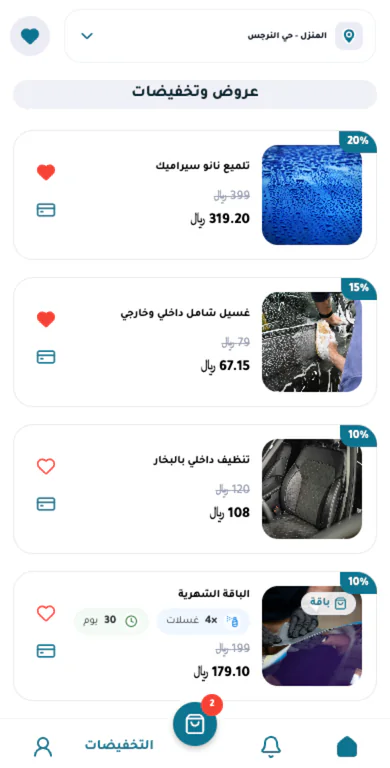
Our team finishes it
They connect the payment gateway, review the app, then prepare it and publish it to the app stores from your account.What does publishing to the app stores involve?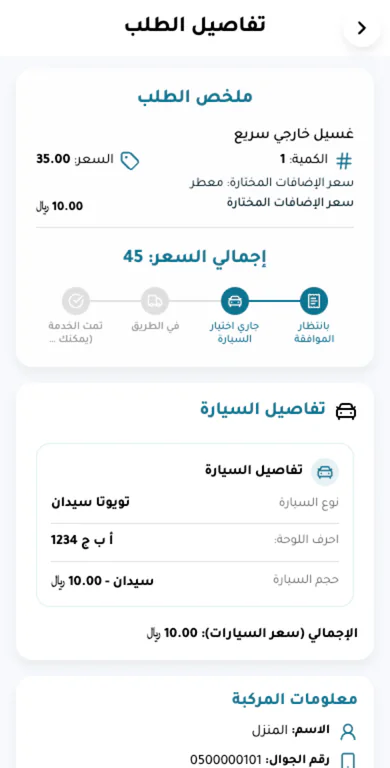
// AI + a human team
AI builds, engineers finish.
The machine builds fast, and people finish what needs judgment and responsibility: payments, review, and the app stores.
80%
AI
- Builds the screens, the logic and the database
- Applies your changes from the chat
- Saves every edit as a version you can restore
- Checks the code before it reaches the preview
20%
The Syoof Web team
- Connects the payment gateway in your app
- Reviews the app before delivery
- Prepares the store version and publishes it from your account
- Answers the help requests you open from your project page
The split describes how we work. It is not a measurement of any single project.
// Publishing
Publishing to the app stores, plainly
We tell you what we do and what we don’t control, before you pay anything.
And the website? You can see it and try it in the preview. Publishing it on your own domain is not available yet.
- 01
A developer account in your name
You open Apple and Google developer accounts in your name or your business’s name. You pay both account fees to them directly: Apple yearly, Google once.
- 02
Our team prepares and publishes
On plans that include publishing, our team prepares the store version, publishes it from your account, and follows up with you on review notes.
- 03
The store decides
Apple and Google run the review, set how long it takes, and decide on approval. So we don’t promise a date or guaranteed approval.
Have a question before you start?
Start now
Your idea deserves a try.
Start in your own words, or try a ready-made app now with no account.
Have a question? FAQ